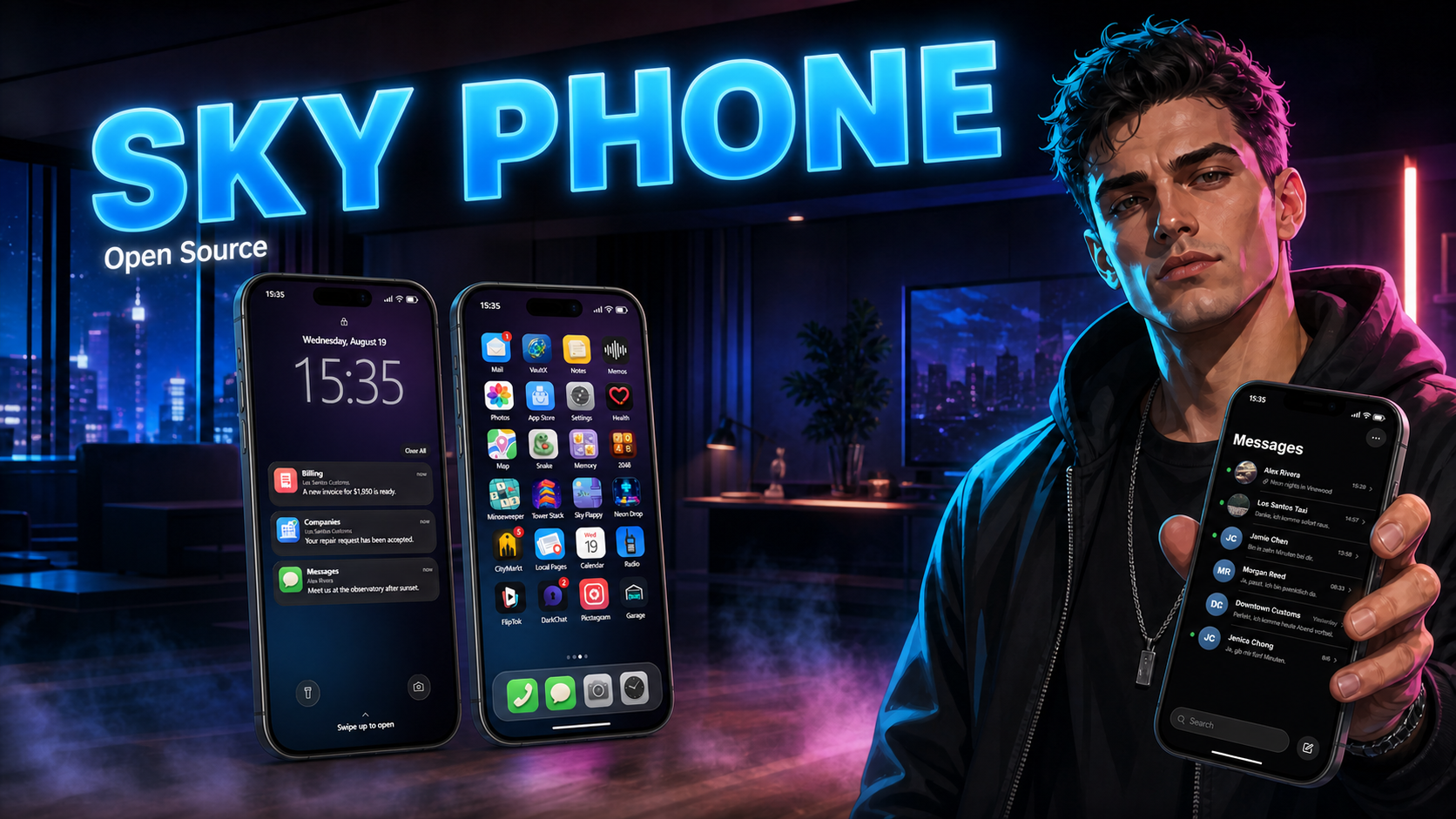
Description
[!WARNING]
Installing on a server? Download the prebuilt resource, not the source code.
Open Releases → Assets (https://github.com/sky-systems/sky_phone/releases/latest) and choose `sky_phone-<version>.zip`.
Code → Download ZIP, Source code (zip) and Source code (tar.gz) contain developer sources without the built phone UI. They are not ready to install.
Extract the release ZIP and copy its complete `sky_phone` folder into your server's `resources` directory. Node.js and pnpm are only needed when building from source.
Sky Phone: Free FiveM Phone Script
The complete, free FiveM phone for ESX, QBCore, and Qbox.
A premium-grade smartphone experience with 41 built-in apps, LB Phone migration, and first-class custom app support.
Explore the real phone directly in your browser.
No download, no FiveM server, and no installation required.
Live demo
•
Download for free
•
Discord support
Jump to: App ecosystem · Compatibility · Installation · LB Phone migration · Custom apps · Support
Sky Phone is a free and open-source FiveM phone script built to give serious roleplay servers the depth, polish, and flexibility normally associated with paid marketplace phones. It combines a modern iPhone-inspired interface, persistent devices and SIM cards, social networks, media, business tools, services, games, and broad framework support in one complete resource.
Coming from LB Phone? Sky Phone is designed to replace it. A controlled migration workflow transfers supported player data, while compatibility adapters keep supported LB Phone custom apps available. You can preview the import, migrate when you are ready, retry safely, and roll back migration-created Sky Phone records.
This is not a cut-down free alternative. Sky Phone includes the core experience server owners and players expect from a leading paid FiveM phone, plus full source access, no purchase price, no feature paywalls, and no forced ecosystem lock-in.
The production frontend is included in the published release package, so a normal server installation does not require Node.js or pnpm. GitHub's automatically generated source archives do not contain that build.
Why Sky Phone stands out
| What matters | What Sky Phone delivers |
| Value | A complete FiveM phone that is free to download, use, inspect, and customize under GPL-3.0. |
| Player experience | A cohesive, responsive Sky UI with light and dark modes, persistent accounts, devices, SIM cards, media, social apps, services, and games. |
| Feature depth | 41 built-in apps covering communication, social roleplay, business, navigation, media, utilities, and entertainment. |
| LB Phone replacement | Command-only migration with dry runs, progress output, safe retries, and removal of migration-created records. |
| Custom apps | Native custom app APIs plus compatibility adapters for LB Phone, 17Movement, High Phone, Quasar Smartphone, and YSeries app contracts. |
| Server flexibility | ESX, QBCore, and Qbox support with adapters for popular inventories, voice systems, garages, and housing resources. |
| Ownership | Readable source code, automatic database upgrades, customer-owned configuration, and no paid add-on packs required for the complete core experience. |
| Help when needed | Installation and configuration help from the Sky-Systems community on the official Discord (https://discord.gg/sky-systems). |
Sky Phone is built to be the free FiveM phone you can choose without accepting a downgrade. Instead of paying first and discovering limitations later, server owners get the complete foundation, the source, migration tooling, and room to extend it from day one.
One phone, a complete app ecosystem
| Category | Included apps and experiences |
| Communication | Phone, Messages, Mail, DarkChat, Radio, EasyShare, group messaging, company calls, voice messages, and world payphones |
| Social | Picstagram, FlipTok, Feather, Flare, and CrewLink |
| City & business | Banking, Billing, Companies, CityMarkt, Local Pages, Garage, Housing, Maps, SkyRide, KnoWay, Weazel News, CityWarn, Crypto, and Health |
| Media & productivity | Camera, Photos, Music, Calendar, Clock, Notes, Voice Memos, Calculator, and Weather |
| Games | Snake with levels, changing fruit and skins; Memory, Number Merge, Minesweeper, Tower Stack, Sky Flappy, and Neon Drop |
| Phone system | App Store, Settings, lock screen, setup assistant, notifications, widgets, folders, passcodes, optional Face ID, multiple wallpapers, and light/dark appearance |
Snake advances one level every 10 points, cycles through six food appearances, and changes between four skins every 30 points. The selected game speed stays unchanged. Restarting a round resets the level and skin; the high score remains saved. Artwork prompts and the existing visual reference are recorded in the Snake asset directory.
KnoWay (https://github.com/sky-systems/sky_phone/blob/1.5.0/docs/knoway.md) adds optional autonomous robotaxi bookings with map/GPS destinations and prepaid fixed fares. The free resource includes the `knowayest` vehicle directly in its `stream/` and `data/` folders. The app remains disabled by default; choose the bundled model or a verified custom model and enable it through `config.lua` or `/phonepanel`. OneSync and in-game acceptance are required.
Built for players, owners, and developers
| For players | For server owners | For developers |
| A polished phone that feels like one connected product | A free replacement for fragmented or expensive phone setups | Full source access and a documented-in-code integration surface |
| Persistent phones, SIMs, accounts, settings, and content | Automatic schema installation and upgrades | Client and server exports for custom app lifecycle and permissions |
| Social, business, media, utility, and game experiences | Framework, inventory, voice, garage, and housing bridges | Compatibility layers for established FiveM phone app ecosystems |
| 16 bundled locales with English fallback | Controlled LB Phone migration with preview and rollback | Vue 3, TypeScript, Pinia, Vite, and reusable Sky UI components |
Compatibility at a glance
| Layer | Supported options |
| Frameworks | ESX Legacy, QBCore, Qbox |
| Inventories | ak47_inventory, codem-inventory, core_inventory, jaksam_inventory, jpr-inventory, lj-inventory, mf-inventory, one_inventory, origen_inventory, ox_inventory, ps-inventory, qb-inventory, qs-inventory, smx-inventory, tgiann-inventory, hex_4_inventory, and native ESX inventory |
| Calls | YACA, PMA Voice, SaltyChat |
| Radio | YACA, PMA Voice, SaltyChat |
| Housing | RTX Housing, Quasar Housing, TGIANN House, VMS Housing, RX Housing, NoLag Properties, SN Properties, ESX Property, qbx_properties, TK Housing |
| Garages | Built-in/custom data and a broad set of popular garage providers configured through the bridge |
| Custom app contracts | Sky Phone, LB Phone, 17Movement, High Phone, Quasar Smartphone, YSeries |
| Languages | Arabic, Chinese, Czech, Dutch, English, Finnish, French, German, Italian, Polish, Portuguese, Russian, Serbian, Spanish, Swedish |
| Database | MySQL or MariaDB through oxmysql |
Optional invoice and bank adapters are documented in the finance setup guide.
Feature highlights
• Modern Sky UI with responsive interactions, light and dark appearance, widgets, folders, notifications, and a full setup flow
• Unique physical handsets with IMEI metadata or one persistent virtual phone per character
• Registered, anonymous, physical, and automatic virtual SIM card modes
• Calls, group messages, reactions, media, contacts, location sharing, money sharing, voice messages, and payphones
• Real account-backed social and service apps with persistent player content
• Camera photos and videos, Gallery, Voice Memos, server music, YouTube playback, and EasyShare
• Banking, invoices, garages, housing, companies, ride hailing, news, marketplace listings, maps, and weather
• Seven built-in games plus an App Store for optional and custom apps
• Automatic database installation and versioned upgrades
• LB Phone migration with preview, progress reporting, safe retries, and rollback support
• Custom app APIs and compatibility adapters for established phone ecosystems
• 16 bundled locales with English fallback throughout the player-facing interface
Requirements
Required
| Requirement | Supported options |
| Database | MySQL or MariaDB |
| Database bridge | `oxmysql` |
| Framework | ESX Legacy (`es_extended`), QBCore (`qb-core`), or Qbox (`qbx_core`) |
| Inventory | Choose one supported adapter from the table below |
| Inventory (configuration value) | Metadata support | Unique Phones | Notes |
| `jaksam_inventory` (`jaksam`) | Yes | Yes | Direct per-slot metadata; usable items are registered through jaksam_inventory |
| `qs-inventory` (`qs`) | Yes | Yes | Full per-slot metadata |
| `ps-inventory` (`ps`) | Yes | Yes | QBCore only; uses item `info` metadata |
| `codem-inventory` (`codem`) | Yes | Yes | Full per-slot metadata |
| `tgiann-inventory` (`tgiann`) | Yes | Yes | Per-slot metadata; item definitions must enable `hasMetadata` |
| `core_inventory` (`core`) | Version-dependent | Version-dependent | Current provider APIs differ from the Phone 1.1.0 adapter. See the Core setup limits (https://www.sky-systems.net/docs/scripts/free-phone/installation#core-and-mf). |
| `jpr-inventory` (`jpr`) | Yes | Yes | QBCore only; uses item `info` metadata |
| `origen_inventory` (`origen`) | Yes | Yes | Full per-slot metadata |
| `ak47_inventory` (`ak47`) | Yes | Yes | Uses per-slot item `info` metadata |
| `one_inventory` (`one`) | Yes | Yes | Full per-slot metadata |
| `ox_inventory` (`ox`) | Yes | Yes | Full per-item phone and physical SIM metadata |
| `mf-inventory` (`mf`) | Yes | Yes | ESX only |
| `smx-inventory` (`smx`) | Character / item name | Limited | ESX only. Multiple copies and arbitrary item trades cannot preserve separate identities. See SMX limits (https://www.sky-systems.net/docs/scripts/free-phone/installation#smx-hex-and-native-esx). |
| `lj-inventory` (`lj`) | Yes | Yes | QBCore inventory with item `info` metadata |
| `qb-inventory` (`qb`) | Yes | Yes | Uses item `info` metadata |
| `hex_4_inventory` (`hex`) | No metadata support | No, Unique Phones are not possible | ESX only; Sky Phone automatically disables unique phones and physical SIM cards |
| Native ESX inventory (`esx`) | No metadata support | No, Unique Phones are not possible | Count-based items; Sky Phone automatically disables unique phones and physical SIM cards |
`hex_4_inventory` and native ESX inventory cannot persist per-item metadata. Sky Phone therefore forces `Config.Phone.Unique` and `Config.Sim.Enabled` to `false` at runtime whenever either adapter is active.
`Config.Bridge.Inventory = "auto"` detects framework-compatible adapters in the table order. This deliberately matches the Sky inventory priority so a dedicated inventory is selected before a compatibility resource it may run beside. You may configure either the short value shown in parentheses or the exact resource name.
The adapters shared with `sky_base` are implemented locally inside Sky Phone. Installing or starting `sky_base` is not required; Sky Phone remains a standalone resource.
For configuration parity with `sky_base`, `qb-inv` is accepted as an alias for `qb`, while `qbox` selects the Qbox-native `ox_inventory` adapter.
Voice
Phone calls support:
• YACA
• PMA Voice
• SaltyChat
The Radio app supports:
• YACA
• PMA Voice
• SaltyChat
Start the selected voice resource before Sky Phone.
Optional services
• FiveManage V3 Media API for Camera uploads, videos, Voice Memos, and remote Gallery deletion
• GIPHY API for GIF search
• Supported Garage and Housing resources when those apps should use external provider data
Quick installation
Read this first: PHONE_INSTALLATION_IMPORTANT.md contains the required item, shop, startup-order, metadata, multi-device, and troubleshooting steps.
1. Download and extract the latest published Sky Phone release (https://github.com/sky-systems/sky_phone/releases/latest). Do not use GitHub's automatically generated "Source code" archives for a server installation because they do not contain the built frontend.
2. Copy the included resource into your FiveM resources directory and keep its folder name `sky_phone`.
3. Start `oxmysql`, your framework, inventory, and voice resource before Sky Phone.
4. Choose the configuration mode. SQL mode is enabled by default; change managed settings in `/phonepanel`, not in the Lua files.
5. Add the required inventory items and their images. With ox_inventory, also remove the existing NPWD phone handler as described below.
6. Add the two Phone ACE grants below, verify administrator group membership, then add `ensure sky_phone` to `server.cfg`.
7. Restart the server and watch the console for warnings.
[!WARNING]
Using ox_inventory? Removing its NPWD phone handler is a required installation step when that block exists.
Changing `data/items.lua` alone is not enough. Follow Remove the NPWD phone handler before testing the phone item, even if NPWD is stopped or not installed.
Example start order:
```cfg
add_ace resource.sky_phone command.add_ace allow
add_ace resource.sky_phone command.remove_ace allow
ensure oxmysql
ensure es_extended
ensure ox_inventory
ensure pma-voice
ensure sky_phone
```
Replace the example framework, inventory, and voice resources with the providers used by your server.
Sky Phone creates and upgrades its database tables automatically. A manual SQL import is normally not required.
How players open the phone
• Give the player the item configured in `Config.Phone.Item` (default: `phone`).
• Players can use that inventory item or press the configured keybind (default: `F1`).
• The keybind still verifies server-side that the player owns a configured phone item; it does not bypass inventory ownership.
• A SIM card is not required to open or use the phone itself. With `Config.Sim.Enabled = true`, only cellular features such as calls and messages require an inserted SIM.
Configuration
Customer settings are organized in:
```text
sky_phone/config/config.lua
sky_phone/config/media.lua
```
The files contain clearly separated sections for:
| Section | Purpose |
| `Config.Bridge` | Framework, inventory, language, callback timeout, and debug mode |
| `Config.CommandPermissions` | Fixed groups for the admin panel, test data, verification commands, and social moderation |
| `Config.Phone` | Phone item, movement, unique-device mode, and development command |
| `Config.Sim` | Physical or virtual SIM behavior and number formatting |
| `Config.Calls` / `Config.Radio` | Voice providers, call behavior, radio limits, and permissions |
| `Config.Payphones` | Payphone pricing, detected props, validation, and custom spawned locations |
| `Config.Animations` | Phone prop, animations, and portrait/landscape transforms |
| App sections | Limits and behavior for every built-in app |
| `Config.Server` | Stable password and passcode peppers |
| `Config.Companies` | Company directory, jobs, services, and permissions |
| `Config.Media` (`config/media.lua`) | FiveManage, GIPHY, uploads, and Gallery imports |
| `Config.Music` | Server music library and playlist limits |
| `Config.Migrations` | Manual LB Phone migration domains |
| `Config.WeazelNews` | Editorial jobs, categories, and article limits |
Restart `sky_phone` after changing Lua configuration.
Throughout this guide, `Config.*` paths identify the settings in both modes. With
SQL mode enabled, edit those managed fields in the Configurator and save; Lua
examples describe the corresponding file-mode values.
In-game phone configurator
`config/config.lua` is split into Part 1: always file-owned and Part 2: panel-managed.
Part 1 contains the Configurator switch, fixed command permissions and local custom tones.
When the Configurator is enabled, Part 2 and `media.lua` are replaced by shipped defaults plus
saved SQL values; editing those files does not change the active configuration, even on first start.
Start with /phonepanel → Phone configurator → General. Devices and SIM cards, framework and
inventory, phone-use restrictions, hotkeys and commands are grouped there with explanations.
Detail sections remain available and share the same draft. Physical SIM service and one-device-per-item
identity are separate switches. Native ESX and hex inventories force both off because they lack metadata.
Set the switch at the beginning of `config/config.lua` to use SQL-backed configuration:
```lua
Config.PhoneConfigurator = {
Enabled = true,
}
```
When enabled, the generated `source/shared/config_default.lua` is the shipped first-run baseline.
The frontend build recreates this file from `config.lua` and the server-only `media.lua`; do not edit
the generated snapshot directly. Sky Phone creates the `sky_phone_configurator` table automatically,
loads its saved values before framework and phone
modules initialize, and exposes the editor through `/phonepanel`. Nothing autosaves: stage changes
in the Phone Configurator tool and press the checkmark. Saving validates and stores both SQL
payloads, then broadcasts the current configuration through the existing runtime refresh.
Restart after changing frameworks, inventory/voice providers, identity modes or keyboard defaults;
the panel does not restart the resource or overwrite players' saved key bindings.
Part 2 of `config.lua`, including server-only sections, and `Config.Media` are discovered
automatically. Part 1 remains file-owned: `PhoneConfigurator` selects SQL or file mode,
`CommandPermissions` controls access, and `CustomTones` registers local audio files. The fixed
permission table is never displayed or overwritten by the Phone Configurator, and its stable keys do
not change when their commands are renamed in the panel. Lists, nested objects, vectors,
and numeric-keyed Lua tables use structured editors instead of raw JSON. Shipped schema rows stay
editable but cannot be renamed, converted, or removed. Every list and table still accepts any number
of additional rows; administrator-added rows remain removable. Company job keys are intentionally
fully removable because `Config.Companies.Definitions` is a freely managed job collection;
each company's configured services can also be renamed, reordered, removed, or cleared.
Cell tower entries and their offline app/action policies are also fully editable and removable.
For Crypto, market IDs must be unique. Existing markets retain their issued supply and unit
scales; changing `IssuedSupply`, `AssetScale`, or `PriceScale` requires a database migration.
The Configurator rejects incompatible changes before saving any part of the draft. New markets
and other market settings remain editable. Refreshes received during an exchange operation are
applied after that operation releases the lock. Treasury cash, treasury inventory, a
Šaltinis (GitHub): https://github.com/sky-systems/sky_phone