
ScriptsQBCoreQbox🔓 Open sourceFree
Ps Dispatch
QBCore Dispatch
 1 / 6
Description
ps-dispatch
Dispatch and alert system for FiveM. Built with Svelte and Lua. Works on QBCore and QBX.
What is this
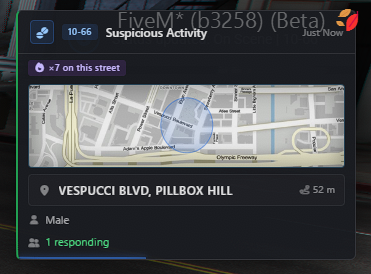
The radio board for your emergency services. Crimes fire alerts, officers respond with a keypress, and the dispatch menu shows every open call with its position, the units on it, and what is known about the suspect and their vehicle.
Alerts are more than notifications here. A call carries the vehicle's plate drawn on its real plate design, the weapon graded by how dangerous it is, the caller's identity, a map crop of the scene, and a search radius when the position is only approximate. Supervisors can declare a major incident to pin it for everyone, and each officer keeps a private log of the plate checks they have run.
Dependencies
| Resource | Why |
| `qb-core` or `qbx_core` | player data, jobs, grades |
| `ox_lib` | callbacks, notifications, locales, keybinds |
| `lsn-radar` DOWNLOAD (https://github.com/LeSiiN/lsn-radar) | Police Radar, Perfect Fit for both ps-mdt and ps-dispatch |
| `PolyZone` | alert zones |
Installation
1. Build the frontend
```bash
cd ui
npm install
npm run build
```
The build writes to `html/` and empties that folder first. Anything you want served belongs in `ui/public/` — that is where the plate images live.
2. Add to server.cfg
```cfg
ensure ps-dispatch
```
3. Set your jobs
`Config.Jobs` decides who receives alerts at all. Everything else is optional.
Configuration
Everything lives in `shared/config.lua`.
Jobs and who sees what
```lua
Config.Jobs = { 'police', 'ambulance' } -- jobs that receive alerts
Config.OnDutyOnly = true -- off-duty units stay quiet
Config.FilterOnDuty = true -- and don't even receive the event
Config.FilteredBroadcast = true -- send only to eligible players
```
`FilteredBroadcast` matters on a busy server: with it off, every alert goes to every player and each client throws away what isn't theirs — bandwidth and event handling that scales with your slot count for no benefit.
Keybinds and commands
```lua
Config.RespondKeybind = 'E' -- attach to the alert on screen
Config.OpenDispatchMenu = 'O' -- open the board
Config.TestCommand = 'dispatchtest'
```
`/dispatchsound` plays the routine, priority and critical tones in sequence so you can hear them against each other. `/dispatchsound ` tries an arbitrary pair.
Alert appearance
```lua
Config.AlertTime = 5 -- seconds on screen; per-alert override in alerts.lua
Config.MaxVisibleAlerts = 3
Config.AlertPosition = 'right'
Config.MaxCallList = 25 -- calls kept on the board
Config.CallLifetime = 3600 -- seconds before a call ages out
Config.UnattendedAfter = 120 -- seconds before a call is flagged unattended
```
Sounds
Three tiers, each a native GTA sound pair:
```lua
Config.AlertSounds = {
default = { audioName = 'Lose_1st', audioRef = 'GTAO_FM_Events_Soundset' },
priority = { audioName = 'CHECKPOINT_MISSED', audioRef = 'HUD_MINI_GAME_SOUNDSET' },
critical = {
audioName = 'TIMER_STOP',
audioRef = 'HUD_MINI_GAME_SOUNDSET',
repeats = 2,
gapMs = 700,
},
}
```
Only the critical tier takes `repeats` and `gapMs`. The repeat matters more than the tone: two unfamiliar beeps are hard to tell apart mid-firefight, but a burst is recognisable even when you can't name the sound. `repeats = 1` gives a single hit. `10_SEC_WARNING` and `5_SEC_WARNING` from the same soundset are drop-in alternatives.
Critical alerts (priority 0)
A tier above the existing red, for calls that make every unit drop what it is doing.
```lua
Config.CriticalCodes = {
'officerdown', 'officerbackup', 'officerdistress', 'emsdown',
'bankrobbery', 'pacificbankrobbery', 'paletobankrobbery',
'vangelicorobbery', 'humanelabsrobbery', 'unionrobbery', 'prisonbreak',
}
```
Nothing is renumbered — other resources keep sending priority 1/2/3 and keep their meaning. Only these code names are lifted above them, and the upgrade happens once on the server, so alerts arriving via `CustomAlert` are covered by their code name alone.
Repeated reports still escalate a routine call to priority 1, but never into this tier: critical is granted, not accumulated. Otherwise noise climbs back to the top over time, which is the problem the tier was added to fix.
Critical calls sort to the top of the board and carry their own treatment — a heavier border and a slow pulse rather than another shade of red, since two reds are hard to tell apart at a glance. The reduced-motion preference drops the pulse and keeps the weight.
Keep the list short. A board where half the calls are critical is the situation this replaced.
Merging and hotspots
```lua
Config.CallMerge = { ... } -- identical nearby reports bump one call
Config.Hotspot = { ... } -- repeated incidents on the same street
```
A repeat report within the merge window bumps the existing call's count instead of creating a new one, and refreshes the fields listed in `MERGE_REFRESH_FIELDS` in `server/main.lua`. Fields identifying the same person or vehicle travel together there, so a merged report can't pair one officer's callsign with another's name.
Search radius and position offset
Alerts with `offset = true` in `Config.Blips` report an approximate position: officers get a circle to search rather than a pin to drive to.
```lua
Config.MinOffset = 1
Config.MaxOffset = 120
```
The displacement is bounded by the circle's own radius, so the incident is always inside the area being searched. It is area-uniform rather than radius-uniform: every point in the circle is equally likely, so the centre is no better a guess than the edge.
Two further rules make the circle mean what it says:
• The offset is fixed per call. Repeat reports move the circle with the incident but reuse the same displacement. Re-randomising each time would let anyone average the jumps and triangulate the true spot.
• The true coordinates never leave the server. Broadcast, targeted alert, call list and menu all strip `coords` from an offset alert. Otherwise the approximation is decoration and anything reading the packet sees through it.
Nine alert types report approximately, with a radius sized to what a witness could plausibly narrow down: shootings and vehicle shots 110 m, suspicious activity 130 m, carjacking and vehicle theft 80 m, fights and house robberies 60 m, plus explosions and suspicious handoffs. Everything else reports a precise position.
Major incidents
A supervisor can declare a call a major incident. It pins to the top of every board, shows as a banner, and optionally quiets routine chatter for the units working it.
```lua
Config.MajorIncident = {
Enabled = true,
Grades = { police = 4, ambulance = 4 }, -- minimum grade per job name
Duration = 1800, -- seconds, then it ends on its own
QuietRoutine = true, -- quiet routine traffic for attached units
MaxActive = 3,
}
```
Deliberately not server-wide silence. Only units attached to an incident are shielded, and only from routine traffic: priority 1 calls, backup requests and anything addressed to a unit always come through. A second emergency across town is never hidden by the first, and the banner only claims traffic is held back for the units it is actually held back for.
Declaring happens from the call itself — open a call and the button sits under Attach — because an incident is always *a specific call*. Two-step confirm, since it changes everyone's board. Anyone of the right grade can stand one down, not just whoever declared it, and it also ends after `Duration` or when the call is cleared. Re-declaring extends rather than resets.
The client hides the button when the grade doesn't qualify, but that's cosmetics — the server re-checks on every declare and stand-down.
Plate check log
The dispatch menu has two tabs: Calls (the shared board) and Plates (this officer's own plate-check log).
```lua
Config.PlateScanner = {
Enabled = true, -- false removes the tab and the tab bar with it
MaxHits = 40,
CodeNames = { 'platecheck' }, -- empty = any alert with a plate AND a footer
BackupButton = true,
BackupCooldownMs = 60000,
}
```
Nothing needs wiring up. Plate checks already arrive as targeted alerts — ps-mdt's `PlateCheckAlert` sends them through `SendTargetedAlert` — and the log keeps the ones that scroll past. Hits never leave the client that ran them, which is both the privacy guarantee and why no database is involved.
A muted `platecheck` type still lands in the log: muting is about screen noise, not about forgetting what you looked up.
Each entry can be dismissed, copied, or escalated with Request backup, which sends the ordinary `OfficerBackup` alert so it reaches the board like any other backup call.
Other settings
| Key | What it does |
| `Config.PinnedCodes` | code names always kept at the top |
| `Config.NotifyRateLimit` | per-player cap on outgoing alerts |
| `Config.AlertCommandCooldown` | cooldown on `/911` and `/311` |
| `Config.PhoneRequired`, `Config.PhoneItems` | require a phone item to call |
| `Config.WeaponWhitelist` | weapons that do not trigger shot alerts |
| `Config.DefaultAlerts`, `Config.DefaultAlertsDelay` | built-in alert set |
| `Config.MdtMapImage` | map image the thumbnails crop from |
| `Config.EnableHuntingBlip` | blips for hunting-zone gunfire |
| `Config.Locations` | zones used by location-based alerts |
| `Config.Blips` | per-alert sprite, colour, radius, sound, offset |
| `Config.Colors` | blip colour table |
Alert payload
Every alert is a table. `message`, `codeName` and `code` are the minimum; everything else refines what responders see.
Core fields
| Field | Type | Purpose |
| `message` | string | the headline — what happened |
| `codeName` | string | key into `Config.Blips`, and what mutes and pins match on |
| `code` | string | radio code shown as a badge, e.g. `10-60` |
| `priority` | number | 0 critical · 1 urgent · 2 routine · 3 low |
| `coords` | vector3 | where it happened |
| `street` | string | resolved street and zone |
| `jobs` | table | which job types receive it |
| `icon` | string | Font Awesome class |
| `information` | string | free text under the header |
| `alertTime` | number | seconds on screen, overrides `Config.AlertTime` |
Vehicle fields
| Field | Type | Purpose |
| `vehicle` | string | display name of the model |
| `plate` | string | the characters |
| `plateIndex` | number | which plate design the vehicle wears (0-5) |
| `color` | string | paint description |
| `class` | string | localised vehicle class |
| `doors` | string | door count |
| `heading` | string | direction of travel |
`plateIndex` is what lets the UI draw the number on its real plate art instead of a grey badge. It comes from `GetVehicleNumberPlateTextIndex(vehicle)`, and `GetVehicleData()` collects it automatically — any alert built from a vehicle already carries it.
The index order is not the intuitive one:
| Index | Design |
| 0 | Blue on White 2 |
| 1 | Yellow on Black |
| 2 | Yellow on Blue |
| 3 | Blue on White 1 |
| 4 | Blue on White 3 |
| 5 | North Yankton |
Four images cover six designs, so the white variants share. The mapping lives in one place — the `ART` table in `ui/src/components/Plate.svelte` — and the images in `ui/public/plates/`. If a design comes out wrong in game, swap two file names there.
Without a `plateIndex` the plate falls back to the neutral badge rather than guessing. That is deliberate: a plate check is a database lookup with no vehicle in hand, and showing a design nobody verified would be a lie. The plate log works around it by reading the design off the car in front of the officer at the moment of the scan, matching the exact plate string — a near-miss never matches, and a car that has driven off simply yields nothing.
Weapon fields
| Field | Type | Purpose |
| `weapon` | string | display name, e.g. `Carbinerifle MK2` |
| `weaponClass` | string | `pistol` `smg` `rifle` `shotgun` `sniper` `heavy` `taser` |
| `weaponTier` | number | 1 sidearm · 2 long gun · 3 heavy or explosive |
| `automaticGunFire` | boolean | sustained automatic fire |
`weaponTier` is what the alert colours itself by: amber for a sidearm, orange for a long gun, red for heavy. A witness reporting "a rifle" changes how you approach; "Carbine Rifle MK2" does not — so the class leads and the exact model sits quietly beside it.
Both come from `ClassifyWeapon(name)` in `client/utils.lua`, which derives them from the display name in `weaponTable` rather than a second list keyed by hash. A parallel list of 45 hashes would drift out of step the first time one was added. Add a weapon to `weaponTable` and it classifies itself.
Machine guns are graded with the heavy tier: sustained automatic fire is a different problem from a rifle, and that distinction is the point of the tiers.
Person fields
| Field | Type | Purpose |
| `name` | string | officer or caller name |
| `callsign` | string | unit callsign, rendered as a badge beside the name |
| `gender` | string | localised |
| `number` | string | caller's phone number |
`callsign` is the identifier used on the radio, so it renders as a badge pinned to the name rather than as another dot-separated fact. It travels with `name` through call merges: refreshing one without the other would pair one officer's callsign with another's name.
Presentation fields
| Field | Type | Purpose |
| `footer` | table | `{ icon, text, sub, tone }` — marks the alert as an answer rather than a job, so no respond prompt is shown |
| `mapRadius` | number | search circle radius, set from `Config.Blips` |
| `displayCoords` | table | offset position; replaces `coords` on the wire |
| `assigned` | boolean | addressed to this unit; bypasses every mute |
| `listed` | boolean | set by the server for calls on the board, so an open menu can add them live |
Custom alerts
CustomAlert
```lua
exports['ps-dispatch']:CustomAlert({
message = 'Suspicious vehicle',
codeName = 'suspicious',
code = '10-66',
priority = 2,
coords = GetEntityCoords(ped),
vehicle = 'Sultan RS',
plate = 'ABC123',
plateIndex = GetVehicleNumberPlateTextIndex(veh),
jobs = { 'leo' },
})
```
Add a `Config.Blips` entry under the same `codeName` to give it a blip, sound, radius and offset.
SendTargetedAlert
Send to specific players only. Nothing is filtered — any field you pass arrives:
```lua
exports['ps-dispatch']:SendTargetedAlert({ src }, {
message = 'Plate Hit',
code = '10-28',
codeName = 'platecheck',
plate = 'ABC123',
footer = { icon = 'fas fa-triangle-exclamation', text = 'Comes back flagged', tone = 'alert' },
})
```
Pass `addToList = true` to also put it on the shared board; without it the alert stays private.
Localisation
Eight languages in `locales/`: `en` `de` `es` `fr` `nl` `pt-br` `tr` `cs`. Every string the Lua side shows goes through `locale()`.
Server-side messages that reach a player send a reason code rather than a finished sentence, and the client translates it — so the text lands in the language of whoever is reading it, not whatever the server runs.
The UI itself is English. If you add a key, add it to all eight files: a missing key renders as the key name, not as a fallback.
Notes
• `html/` is generated. Never edit it — edit `ui/src/` and rebuild.
• `ui/public/` survives a build; `html/` does not.
• `Config.Debug = true` also alerts when LEO break the law: useful for testing, noisy in production.
Preview
Dispatch Menu
Plates Tab
Preset Alert Exports.
```lua
• exports['ps-dispatch']:ArtGalleryRobbery()
• exports['ps-dispatch']:CarBoosting(vehicle)
• exports['ps-dispatch']:CarJacking(vehicle)
• exports['ps-dispatch']:CustomAlert()
• exports['ps-dispatch']:DeceasedPerson()
• exports['ps-dispatch']:DrugBoatRobbery()
• exports['ps-dispatch']:DrugSale()
• exports['ps-dispatch']:EmsDown()
• exports['ps-dispatch']:Explosion()
• exports['ps-dispatch']:Fight()
• exports['ps-dispatch']:FleecaBankRobbery(camId)
• exports['ps-dispatch']:HouseRobbery()
• exports['ps-dispatch']:HumaneRobbery()
• exports['ps-dispatch']:Hunting()
• exports['ps-dispatch']:InjuriedPerson()
• exports['ps-dispatch']:OfficerDown()
• exports['ps-dispatch']:OfficerBackup()
• exports['ps-dispatch']:OfficerInDistress()
• exports['ps-dispatch']:PacificBankRobbery(camId)
• exports['ps-dispatch']:PaletoBankRobbery(camId)
• exports['ps-dispatch']:PrisonBreak()
• exports['ps-dispatch']:Shooting()
• exports['ps-dispatch']:SignRobbery()
• exports['ps-dispatch']:SpeedingVehicle(vehicle)
• exports['ps-dispatch']:StoreRobbery(camId)
• exports['ps-dispatch']:SuspiciousActivity()
• exports['ps-dispatch']:TrainRobbery()
• exports['ps-dispatch']:UndergroundRobbery()
• exports['ps-dispatch']:UnionRobbery()
• exports['ps-dispatch']:VangelicoRobbery(camId)
• exports['ps-dispatch']:VanRobbery()
• exports['ps-dispatch']:VehicleShooting(vehicle)
• exports['ps-dispatch']:VehicleTheft(vehicle)
• exports['ps-dispatch']:YachtHeist()
• exports['ps-dispatch']:BobcatSecurityHeist()
```
Steps to Create New Alert
Add the following into your `alerts.lua` and change to your liking:
```
local function TestAlert()
local coords = GetEntityCoords(cache.ped)
local vehicle = GetVehicleData(cache.vehicle)
local dispatchData = {
message = locale('testalert'), -- add this into your locale
codeName = 'testalert', -- this should be the same as in config.lua
code = '10-35',
icon = 'fas fa-car-burst',
priority = 2,
coords = coords,
street = GetStreetAndZone(coords),
heading = GetPlayerHeading(),
vehicle = vehicle.name,
plate = vehicle.plate,
color = vehicle.color,
class = vehicle.class,
doors = vehicle.doors,
jobs = { 'leo' }
}
TriggerServerEvent('ps-dispatch:server:notify', dispatchData)
end
exports('TestAlert', TestAlert)
```
Add codeName in `config.lua` for the particular robbery to display the blip
["testalert"] is the codename you passed with the TriggerServerEvent in step 1
```
['testalert'] = { -- Need to match the codeName in alerts.lua
radius = 0,
sprite = 119,
color = 1,
scale = 1.5,
length = 2,
sound = 'Lose_1st',
sound2 = 'GTAO_FM_Events_Soundset',
offset = false,
flash = false
},
```
Information about each parameter is in the `alerts.lua` file.
FAQ
• There are no calls showing on dispatch or mdt list.
• Make sure you have a job type specified in your qbcore/shared/jobs.lua like:
• Make sure that you're using the correct job type as leo and make sure your qb-core (https://github.com/qbcore-framework/qb-core) is fully updated to the latest version.
• On shared/config.lua make set Config.Debug = true to test calls as police officer.(ONLY to be used as testing, make sure to disable on live production)
• How to change colors of the cal
Šaltinis (GitHub): https://github.com/Project-Sloth/ps-dispatch
Licencija: GPL-3.0 · ⭐ 224 GitHub žvaigždučių. Autoriai — repozitorijos kūrėjai; MeZo Klubas tik pateikia nuorodą į oficialų šaltinį.
Version history
- v3.0.0Latest22 November 2026
What's Changed • Merge PRs by @MonkeyWhisper in https://github.com/Project-Sloth/ps-dispatch/pull/320 Full Changelog: https://github.com/Project-Sloth/ps-dispatch/compare/2.2.2...3.0.0
Reviews
Sign in with Discord to leave a review.
No reviews yet. Be the first!

Similar resources

VIP
ScriptsESXQBCore+2
LB | Phone
The most popular phone on FiveM
⬇ 6👁 53☆ —v2.8.1
Free
ScriptsStandaloneox_core+3🔒 Escrow
Hide In Dumpster
NProbleM Dumpster lets players hide inside the dumpsters that are already on the GTA map. Walk up, lift the lid, climb in and wait it out, while everyone nearby sees the same animation on the same fra
⬇ 2👁 24☆ —v1.0.0
Free
ScriptsESXQBCore+2🔓 Open source
Sky Phone
Phone Script for FiveM
⬇ 2👁 20☆ —v1.6.1

Free
UI / HUDESXQBCore+1
Risk | Better Hud V3
A complete FiveM HUD script for ESX, QBCore and QBox: status bars, money, weapon, speedometer, radio list, compass, notifications, announcements, team chat and a visa system with playtime rewards. Pla
⬇ 2👁 31☆ —v1.0.0
