Description
murderface-appearance
Drop-in replacement for illenium-appearance with a completely rebuilt UI. Custom Svelte 5 frontend, orbital camera, and redesigned controls — works with every resource that calls `illenium-appearance` exports without changing anything.
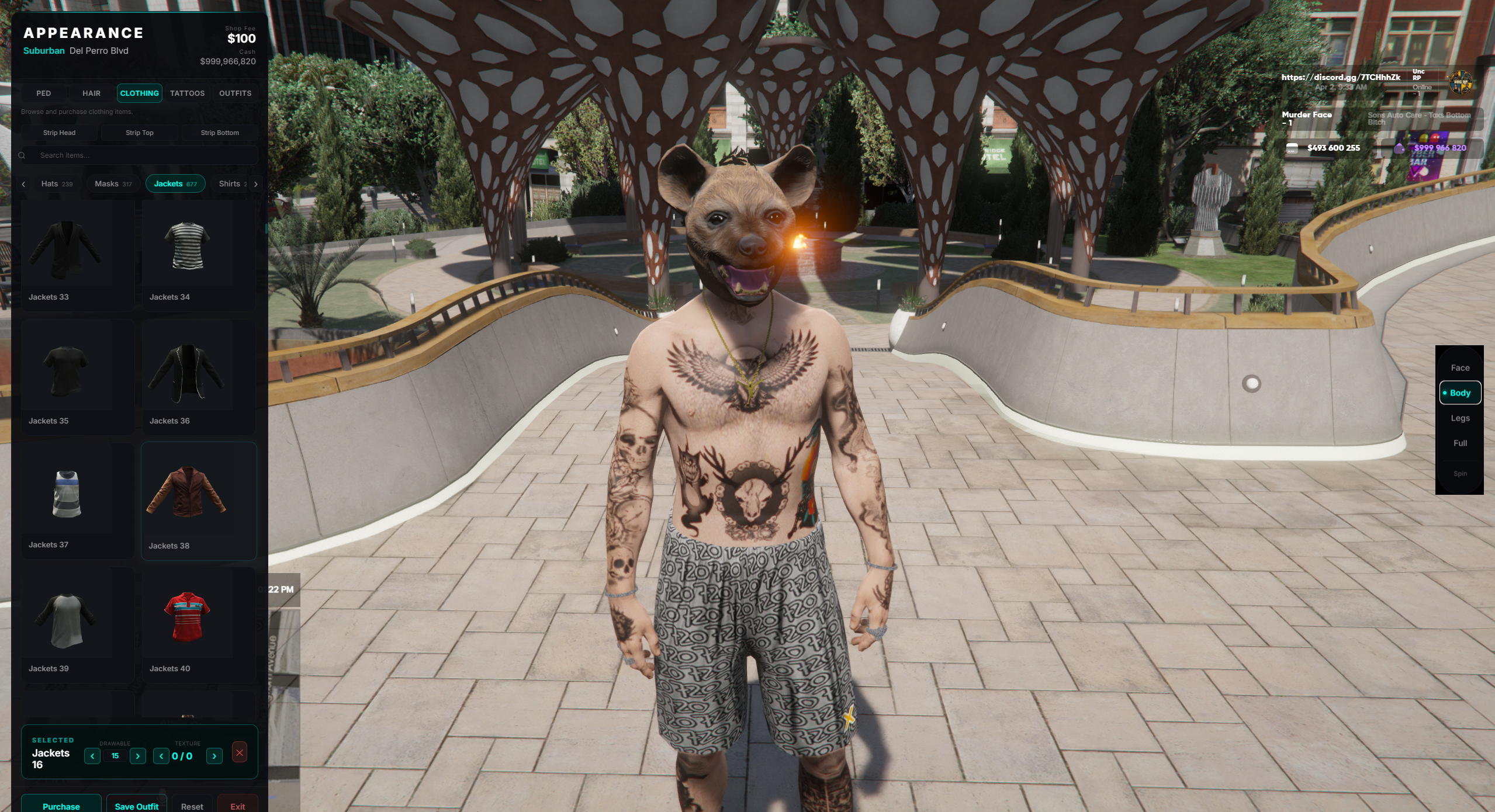
Jacket thumbnails with real clothing images, category tabs with item counts, detail bar with drawable/texture stepping
Video Walkthrough (https://www.youtube.com/watch?v=9jtR9ljcFWw)
Why This Exists
The original illenium-appearance UI works but feels dated. This is a ground-up rebuild of the frontend while keeping full backend compatibility. Every export, every event, every database table — identical. Swap the resource folder and everything just works.
What You Get
• Visual clothing browser with thumbnail images per drawable — no more guessing what "Hats 37" looks like
• Orbital camera — drag to orbit your character, scroll to zoom, camera presets snap to head/body/legs
• Properly sized controls — 32px+ buttons, 20px slider thumbs, 24px color picker dots. Built for mouse, not mobile
• Editable number inputs — type a parent ID directly instead of clicking arrows 45 times
• Arrow cycling — tab arrows step through sections and categories, not just scroll the container
• Tattoo preview nav — step through tattoos one by one, previewed tattoo highlights and auto-scrolls in the list
• Store ground markers — color-coded rings at every clothing, barber, tattoo, and surgeon location
• Glassmorphic UI — dark panel with blur, cyan accent, fills the left side of the screen
Screenshots
| Model select with ped grid and freemode buttons | Clothing browser with thumbnail images per drawable |
| Tattoo browser with zones, search, opacity, preview/apply | Outfit manager — save, share, import via codes |
Compatibility
Registers exports under both `murderface-appearance` and `illenium-appearance` via FiveM's `__cfx_export_` event system. Tested with:
• um-multicharacter (character select skin loading)
• qbx_core (character.lua appearance calls)
• qbx_properties, qs-housing (wardrobe systems)
• codem-pausemenu (skin reload)
• mp-masks (appearance save/restore)
• ox_inventory (clothing item handlers)
Installation
1. Drop `murderface-appearance` into your resources folder
2. `ensure murderface-appearance` in server.cfg — before um-multicharacter or anything that calls illenium exports
3. Remove or stop any existing `illenium-appearance` or `bl_appearance`
4. Restart server
Uses `provide "illenium-appearance"` plus manual export registration so existing resources find it automatically.
Requirements
• oxmysql (https://github.com/overextended/oxmysql)
• ox_lib (https://github.com/overextended/ox_lib)
• QBX / QBCore / ESX / ox_core (auto-detected)
Optional: Clothing Thumbnails with uz_AutoShot
uz_AutoShot (https://github.com/uz-scripts/uz_AutoShot) by UZ — automatic clothing thumbnail generator with transparent backgrounds. Captures every drawable/texture variation via an in-game green screen studio, then serves them as transparent PNGs through FiveM's native `cfx-nui` protocol.
| Magenta chroma key studio with orbit camera and capture UI | Automatic capture iterates every drawable variation |
| Finished transparent thumbnail — hats | Finished transparent thumbnail — tops |
When installed, murderface-appearance detects it automatically and loads thumbnails from AutoShot — no configuration needed.
1. Install uz_AutoShot (https://github.com/uz-scripts/uz_AutoShot/releases/tag/1.1.2) and `ensure uz_AutoShot` before this resource
2. In-game: `/shotmaker` to open the capture studio and generate images
3. Restart — thumbnails load automatically in the clothing browser
Huge shoutout to UZ for building this and letting us integrate it — go star their repo (https://github.com/uz-scripts/uz_AutoShot)!
Commands
| Command | Description |
| `/clothing` | Clothing shop (components + props) |
| `/barber` | Barber shop (hair + overlays) |
| `/tattoo` | Tattoo shop |
| `/outfits` | Outfit manager |
| `/appearance` | Full customization (all sections) |
| `/reloadskin` | Reload appearance from database |
| `/clearstuckprops` | Remove stuck attached objects |
| `/pedmenu [id]` | Admin: full menu on self or target player |
Database
Same `playerskins` and `player_outfits` tables as illenium-appearance. No migration needed.
Config
Everything in `shared/config.lua` — store locations, pricing, clothing rooms, blacklists, theme. Store interaction uses `[E]` text UI with `lib.zones` and ground ring markers within 30m.
Building the UI
```
cd web/src
npm install
npm run build
```
Outputs to `web/dist/`. The build is IIFE format for FiveM CEF compatibility (no ES modules).
Changelog
See Releases (https://github.com/fruitmob/murderface-appearance/releases) for full version history.
• v2.1 — UX overhaul, Gemini QA polish, export compatibility fix, store ground markers
• v2.0 — Initial release with Svelte 5 UI rebuild, orbital camera, all illenium exports
Contributing
PRs welcome — especially for new locales, bug fixes, framework compatibility, or UI improvements.
1. Fork the repo
2. Make your changes (UI source is in `web/src/`, Lua in `game/` and `client/`)
3. `cd web/src && npm run build` to rebuild the NUI
4. Test in-game
5. Open a PR
Credits
• Original illenium-appearance by snakewiz (https://github.com/snakewiz) & iLLeniumStudios (https://github.com/iLLeniumStudios)
• Clothing thumbnail integration: uz_AutoShot (https://github.com/uz-scripts/uz_AutoShot) by UZ (https://github.com/uz-scripts) — transparent clothing screenshots served via cfx-nui
• Tattoo support from franfdezmorales (https://github.com/franfdezmorales/fivem-appearance)
Šaltinis (GitHub): https://github.com/fruitmob/murderface-appearance

 1 / 5