Description
MBT Malisling — Weapon on Back & Tactical Carry for FiveM
Your weapon stops being an icon in a menu and becomes an object in the world.
It rides on your back or your hip where everyone can see it. You can hide it under a jacket, hand it to someone, leave brass on the floor when you fire, and read the serial off a gun to find out whose hands it passed through. Free, for any ESX, QBCore, QBox, or OX server — and it does not touch your combat balance.
Preview
Inspecting a weapon — the serial, and every player who has carried it.
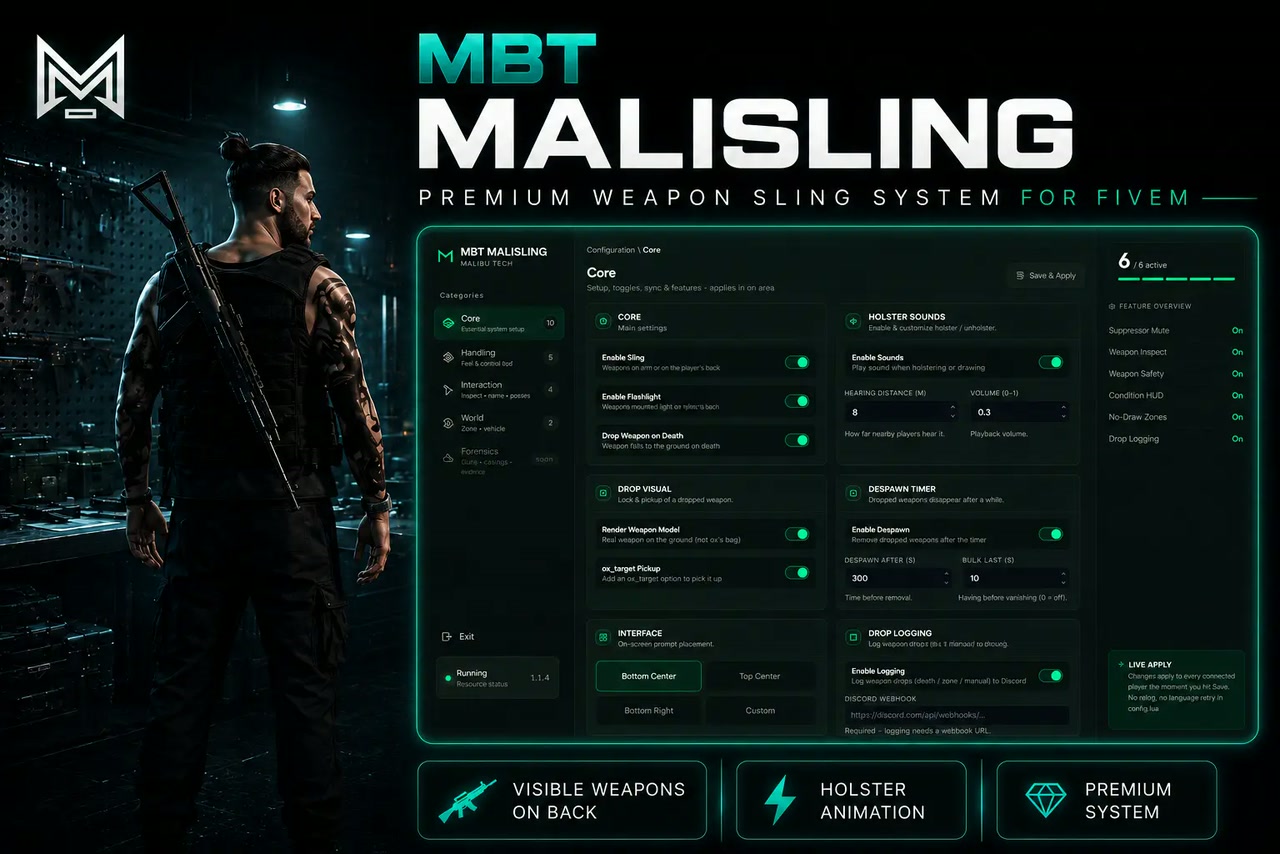
Every feature is toggled and tuned from here, live, without touching a file.
What players get
• The gun is on your body. Rifle across the back, sidearm on the hip, blade at the belt — visible to everyone, in positions the server can tune. Drawing it plays a real holster animation instead of the weapon appearing in your hands.
• Carry two long guns and both are there. A rifle and a shotgun share the same place on your back, and until now one of them was simply invisible. Each gets its own spot, and how you draw either one is an animation the server picked by watching it.
• Hide it under your clothes. A jacket conceals well, a light top conceals badly, a bare torso refuses. Walk around with a subtle tell that you are adjusting something at your belt.
• Weapons jam. How often depends on the condition of the gun, and you clear it under pressure while someone is shooting back.
• Every weapon has a serial, and a memory. Inspect one and you see its serial, its condition, the name engraved on it — and the list of players who have carried it before you.
• Firing leaves brass. Casings stay on the ground, tied to the weapon that fired them. Someone can read a serial off one, or you can pick them up and clean the scene.
• Hand a weapon to another player. They have to accept it. The transfer happens on the server, so nothing duplicates and nothing is lost.
• Store guns where guns go. Wall racks, gun lockers, and vehicle trunks — the weapon is physically in there, with its serial and condition intact.
• Police can pat you down. A badly concealed weapon is found instantly; a well-hidden one takes a search.
What server owners get
• It does not touch combat balance. No recoil changes, no damage changes, no accuracy changes. Everything here is carry, identity, and consequence — so it drops into a server that already has its shooting tuned.
• Configure it in game, not in files. A React dashboard (`/mbt_malisling`) toggles and tunes every feature at runtime. Changes persist to the database and survive the next update, because they do not live in the resource folder.
• Two interface styles, one switch. Every prompt and HUD ships in Standard (fixed on screen) and Cinematic (anchored beside the weapon in the world). Nothing else about the script changes.
• Clients are never trusted. Inventory, serials, ownership and transfers are all resolved server-side. A faked event gets nothing, and every inbound net event is rate-limited per player.
• One resource, four frameworks, two inventories. ESX, QBCore, QBox and OX are auto-detected; `ox_inventory` is primary with a complete `qb-inventory` bridge.
• oxmysql is optional. Without it the script runs DB-free and only the persistence features step aside. Nothing breaks.
• English, Italian and French included, and adding a language is one file.
Full feature list — every feature by system, for anyone implementing rather than evaluating
Carry & Sling
• Visual sling — the weapon shows on the player's body in 6 configurable positions (back, secondary back, hip/side, melee slots), attached per weapon type
• Multi-Weapon Visibility — more than one weapon drawn in the same body slot (`back` alone maps 38 weapons, so a rifle and a shotgun already collide). Up to 4 per slot, each in its own placed position. Off by default: with it off the first weapon sits exactly where it always did. Copies of the same model share one prop; distinct weapons always take a lane first
• Length classes — a slot runs from a sawn-off to a heavy sniper, so a single tuned position leaves one floating and the other through the shoulder. `compact` / `standard` / `long` apply a shift on top of the position, tuned in the same editor
• Tactical Sling prop — a strap/rig worn on the body, on by default: three prop variants ship with the resource and can be assigned per job (e.g. police carry differently), with positions tuned live in the dashboard. Drawn for every player around you, not just for yourself
• Holster prompt — drawing a sidearm shows a branded confirm prompt with gender-specific holster animations and synced holster/unholster sounds (including a blade sound for melee)
• Concealed Carry — toggle to hide a weapon under clothing; server-authoritative, replicated via state bag. Clothing is evaluated (bare torso refuses, light tops conceal *poorly*, jackets conceal *well*) with subtle "adjust your belt" tells
• Low Ready — a choreographed chest-carry stance
• Vehicle Smart Hiding — the sling tucks away sensibly while in vehicles
Weapon Handling
• Weapon Jamming — base jam chance scaled by weapon condition, cleared with a short key-press minigame
• Weapon Throw — throw the weapon forward (the original physics feel), with an optional hold-to-charge power throw (tap = normal, hold = farther; off by default)
• Drop on Death — the equipped weapon falls to the ground as a real, lootable prop
• Weapon Drop rework — dropped weapons spawn as the correct model with an `ox_target` interaction and a despawn timer
• Weapon Safety Toggle — flip the safety on/off (fused into the weapon-status pill)
• Charge Weapon — rack the slide as an intimidation gesture, broadcast to nearby players
• Suppressor Heat Glow — the suppressor heats up under sustained fire and glows orange → red, cooling on the slung prop after holstering (purely visual)
• Weapon Weight / Carry Penalty — carrying many long guns slightly slows movement (preset: off / light / medium / heavy / custom)
• No-Draw Zones — configurable areas where drawing a weapon is disabled, with a cooldowned notice
• Draw Style — choose the animation your character uses to reach for a weapon, per body slot and per job. Pick it by watching it: the in-world picker plays every holster animation in the game on your own character, and stores the clip together with the duration measured from it
Inspection & Identity
• Weapon Inspect — hold a key to examine the held weapon: an inspection animation plus an overlay with serial, condition, custom name and ammo (with an optional *vague ammo* mode)
• Weapon Condition HUD — discrete condition pips (tier 1–5) shown in the weapon-status pill
• Custom Weapon Name — engrave a personal name onto a weapon
• Showcase Poses — synced presentation poses for group photos (late-join aware)
• Synced attachments & flashlight — scope/suppressor/flashlight show on the slung prop, and the flashlight still lights the world from your back. Its saved state survives equip and relog (see *Known limitations* for the engine-level caveat)
Interaction & Social
• Physical Weapon Handoff — hand your weapon to a nearby player: a key-driven consent prompt on the receiver, a server-atomic transfer with rollback, intact metadata, and synced give/take animations
• Ammo Sharing — share ammunition with a nearby player using the same consent flow; the server resolves the right ammo type and transfers atomically with rollback
• Pat-down (LEO) — a job-whitelisted officer can pat someone down (with consent, cuffed-bypass): reveals carried weapons and their carry status (visible / concealed) plus serials, with an audit webhook. Poorly concealed weapons are found instantly; well-concealed ones need a search
Forensics
• Serial Number System — every weapon is guaranteed a serial on first safe contact with the system (writes only on safe transitions — never during fire). Auditable `MBT-XXXXXXXX` format or ox-like
• Chain of Custody — a server-side per-serial ledger of who has held a weapon, surfaced in the Inspect overlay
• Forensic Shell Casings — firing has a server-side chance to leave a brass casing on the ground (golden glint); examine it to read the (masked) serial and age, pick it up to clean the scene. Ephemeral, in-memory, FIFO-capped
Storage
• Weapon Rack / Gun Locker — fixed world racks (config locations) and player-placeable racks from an inventory item (carry → rotate → mount). Contents sync via GlobalState (no networked-prop jitter). Per-job access and a custom key-driven picker showing each weapon's serial, condition and engraved name
• Vehicle Trunk Weapon Rack — stow and retrieve long guns in a vehicle's trunk via `ox_target` on the boot; respects the vehicle lock; prop synced per plate
Admin & Configuration
• Live React dashboard (`/mbt_malisling`) — a premium NUI control panel to toggle and tune every feature in real time, organized by category (Core, Presentation, Handling, Interaction, Forensics, World, Placement), persisted to the database
• Two interface styles — every on-screen prompt and HUD ships in Standard (fixed on screen) and Cinematic (filmic, anchored beside the weapon in the world). One switch in the dashboard changes all of them; nothing else about the script changes
• NUI Position Editor — a live, in-world editor (orbit camera, preview prop, button controls) to set each weapon type's sling position per type and per job, saved to the database
• Gesture picker — the same idea for animation: the dashboard steps aside, a camera frames your character, and every holster clip plays on demand so you can keep the one that reads
• Brand accent colour — one colour, set from the dashboard, on every prompt and HUD your players see. It is your server's colour for its players; the panel itself keeps its own
• Hidden by Job — body slots that never show a prop, per job, set from the panel. Police uniforms usually model a pistol into the clothing, so an officer would otherwise carry two
• Dev tuning commands — `/mbt_racktune` and `/mbt_trunktune` print ready-to-paste offset lines for fine placement (admin / debug only)
Requirements
| Dependency | Notes |
| FiveM Server (https://fivem.net) | OneSync enabled (required) |
| ox_lib (https://github.com/overextended/ox_lib) | Required |
| ox_inventory (https://github.com/overextended/ox_inventory) or qb-inventory (https://github.com/qbcore-framework/qb-inventory) | One of the two |
| oxmysql (https://github.com/overextended/oxmysql) | Optional — enables persistence (racks, trunk, custody, positions). Already present on most servers |
Frameworks: ESX · QBCore · QBox · OX (auto-detected).
Installation
### ⚠️ Upgrading from 1.x? Replace the whole folder — do not keep your old `config.lua`
The old `config.lua` opens with `MBT = {}`, and it is loaded after `default.lua`. Keeping it wipes every default the new version needs, and the script will not start.
Configuration also moved. In 1.x everything lived in `config.lua`; now feature tuning lives in `default.lua` and is meant to be changed live from the dashboard, while `config.lua` holds only server settings (admin command, language, notifications, webhooks). Your 1.x tuning will not carry over — set it again from the dashboard, where it will persist to the database and survive future updates.
Delete the old folder, drop in the new one, and re-apply your settings. There is no migration path: 2.0 is effectively a different script.
1. Download or clone this repository into your server's `resources` folder.
2. Add to your `server.cfg` (after your framework and inventory):
```cfg
ensure ox_lib
ensure ox_inventory # or qb-inventory
ensure mbt_malisling
```
> After the first start, restart the server once so the sling convar applies cleanly.
3. (Optional) Register the gun-rack item if you want players to place racks from inventory.
ox_inventory — `ox_inventory/data/items.lua`:
```lua
['gunrack'] = {
label = 'Gun Rack',
weight = 8000,
stack = false,
server = { export = 'mbt_malisling.gunrack' },
},
```
qb-inventory — `qb-core/shared/items.lua`:
```lua
['gunrack'] = { name = 'gunrack', label = 'Gun Rack', weight = 8000, type = 'item',
image = 'gunrack.png', unique = true, useable = true, shouldClose = true,
description = 'Wall-mountable weapon rack' },
```
> The item name, the `server.export` suffix, and `MBT.WeaponRack.Placement.Item` in `default.lua` must all match.
4. Restart your server, or run `ensure mbt_malisling` in the live console.
5. Open the admin dashboard in-game with `/mbt_malisling` (admin only) and tune to taste.
Configuration
Configuration is split across two files plus the live dashboard:
• `default.lua` — the complete default block for every feature (toggles, thresholds, animations, positions). Loaded first. Most values are meant to be tuned live from the dashboard, not by hand.
• `config.lua` — server settings and every keybind: `Admin` (command + ACE permission), `Keybinds`, `QBWeapons`, `Language`, `Debug`, `Notification`, `ReduceMotion`, `VersionCheck`, and the Discord audit webhooks. Loaded after `default.lua`, so it can override any default.
• Dashboard (`/mbt_malisling`) — toggles and tunes features at runtime; changes persist to the `mbt_malisling_config` database row and survive resource updates.
```lua
-- config.lua
MBT.Language = 'en' -- 'en', 'it', 'fr'
MBT.Debug = false -- debug logs + dev tuning commands
MBT.Admin = {
Command = 'mbt_malisling',
Permission = 'command.mbt_malisling', -- ACE permission for the dashboard + placement
}
```
Notifications: the notify function in `config.lua` ships presets for ox_lib, ESX, QBCore, QBox, and native GTA — uncomment the one that matches your server.
Keybinds — set them before your first start
Every key the resource binds is listed together in `config.lua`, under Keybinds. Set `''` for no key: each feature keeps its chat command either way.
They are the one setting the dashboard cannot change, and there is a reason. Bindings register once when the resource starts, and FiveM then caches them per player profile — so changing a key later moves nothing for anyone who has already joined your server. After that point it is the player who rebinds, in GTA Settings → Key Bindings → FiveM, where every binding appears prefixed with `[MBT]`.
Two things worth knowing. The holster prompt's two bindings each carry the input family they belong to; change `Key` and `Input` together, because a keyboard key left on `MOUSE_BUTTON` never fires and never says so. And `config.lua` is replaced when you update, like every other file in the folder — keep a note of your keys, or you will set them again after the next release.
Officers carrying two pistols
Most police uniforms — GTA's own and nearly every EUP pack — have a duty holster with a pistol modelled into the clothing. We attach ours on the same hip, so the officer ends up with two. The second one lives in the mesh: nothing can see it or move it.
Hide ours for that job, in `config.lua`:
```lua
MBT.HiddenByJob = {
['police'] = { ['side'] = true },
}
```
Keys are body slots, not weapon families: `side` is every pistol, `back` every long gun. The rule applies to everyone who sees that officer, and it re-evaluates the moment they change job.
The job `'*'` means everyone. Use it when a slot should never show at all — pistols that draw normally and never hang on the hip — rather than listing every job on your server to mean "never":
```lua
MBT.HiddenByJob = { ['*'] = { ['side'] = true } }
```
It is per job, not per outfit — an officer in plain clothes has the same job and no modelled holster, and loses their pistol too. Use two jobs if you need the distinction. And if you would rather move our pistol than remove it, `MBT.CustomPropPosition` in `default.lua` has done that all along.
Discord audit logs
Weapon drops, armory racks and pat-downs can each post to a Discord webhook. The URLs live in `config.lua` and not in the dashboard: a webhook is a secret, and the dashboard is rendered on the player's side. They sit behind an `IsDuplicityVersion()` guard so they never reach a client.
```lua
-- config.lua
if IsDuplicityVersion() then
MBT.WeaponDrop.Logging.Webhook = 'https://discord.com/api/webhooks/...'
MBT.WeaponRack.Logging.Webhook = ''
MBT.PatDown.Logging.Webhook = ''
end
```
Leave a URL empty (the default) and that log stays off. No webhook, no logging — nothing else to switch.
Update check
At startup the server asks the GitHub Releases API whether a newer version exists, and the dashboard shows a badge if so. It is one plain GET and sends nothing about your server. Set `MBT.VersionCheck = false` in `config.lua` if you'd rather it made no outbound request at all.
Keybinds
Every one of these is a FiveM keymapping, so a player can rebind it in Settings → Key Bindings → FiveM. The defaults live in each feature's block in `default.lua` as `Key`.
| Key | Action |
| I *(hold)* | Inspect the held weapon |
| K *(hold)* | Throw the held weapon (hold to charge, if enabled) |
| U | Conceal / reveal the weapon under clothing |
| END | Toggle the safety |
| INSERT | Charge the weapon (rack the slide) |
| HOME | Toggle low ready (chest carry) |
| G | Hand your weapon to a nearby player |
| H | Share ammo with a nearby player |
| Y | Pat down a nearby person (job-gated) |
Drawing a sidearm shows a confirm prompt: its two keys are set in `MBT.HolsterControls`.
Commands
| Command | Access | Action |
| `/mbt_malisling` | Admin (ACE) | Open the live configuration dashboard |
| `/pose` · `/pose <n>` | Anyone | Cycle or pick a showcase pose. Command only — no default key |
| `/weaponname` | Anyone | Engrave a name on the held weapon. Command only — no default key |
| `/mbt_placerack` · `/mbt_removerack` | Admin (ACE) | Place / remove a runtime weapon rack |
| `/mbt_rackcount` | Anyone | List the racks you have placed, and your limit |
| `/mbt_clearmyracks` | Anyone | Remove all of your own empty placed racks |
| `/mbt_rackcoords` | Anyone | Print a config line for a fixed rack at your position |
| `/mbt_racktune` | Admin / Debug | Live-tune the per-type weapon offsets on a wall rack |
| `/mbt_trunktune` | Near a stowed vehicle | Live-tune the trunk prop offset per vehicle class/model |
| `/mbt_casingzone` | Admin / Debug | Size a no-casing zone in-world (ranges, armories) and print a ready-to-paste `ExcludeZones` line |
| `/mbt_animaudit` | Debug | Measure every draw animation against your game build: which exist, how long each runs, and which slots are cutting theirs short |
Every command name is configurable — each feature's block in `default.lua` has a `Command` field, and the dashboard's is `MBT.Admin.Command` in `config.lua`.
Exports
Client-side, for other resources on your server. These are the supported ones — treat anything else you find in the source as internal and subject to change.
Šaltinis (GitHub): https://github.com/MalibuTechTeam/mbt_malisling

 1 / 4